The WA5PB Ham Radio AI Project
Browser-based station tools, built by a ham and an AI working together
The Project
This page is about a question I have been exploring since the summer of 2026: how much can an AI contribute to amateur radio, and to the enjoyment of it? My answer so far is three working programs for my own station, all of them built in conversation with Claude, an AI model made by Anthropic.
Every one of them runs in a web browser. There is nothing to install, no account to create, and nothing that needs a particular operating system. A browser can now reach a sound card, a serial port and live data from the internet, which is everything a digital-mode station needs. I wanted tools I could reach from anywhere in the house, or from a small computer in the garage, and that another ham could simply open.
- HF Propagation Map - where the bands are open right now, and where the keyboard-mode operators gather. Released.
- K2 CAT Terminal - a careful, safety-first command window for the Elecraft K2. In development.
- DigiMode - a waterfall, decoder and transmitter for the conversational digital modes, with rig control for the K2 and ten more Elecraft and Kenwood rigs, on a computer or an Android phone. Public Beta.
I have been the project lead throughout: every design decision and every release has been mine. Claude has been my technical consultant and programmer. How that partnership actually works is told below, in Built Together, from both sides.
The Operator and the Station
I am Bill, WA5PB, an Extra Class operator in Crowley, Texas, grid EM12hn. I served ten years as president of the Tarleton Area Amateur Radio Club and have led our local W5YI Volunteer Examiner team. By trade I have spent some thirty-five years in information technology.
I have always been a QRP operator. I loved PSK31 in its heyday, and it saddens me to see how quiet it has become. The digital modes suit me because they blend my two interests, computers and radio, and they make the most of low power. I am a ragchewer at heart: I am not a contester or an awards chaser, and on the big contest weekends I am often found in a quiet corner of the band or with the radio off.
After almost eight years off the air, and two house moves, I am rebuilding the station from scratch. We now live in a city neighborhood with an HOA and a small lot, so the antenna has to be discreet; an attic dipole is in the works. For now I receive on an old G5RV that is, quite literally, lying as a pile of wire in my office. It has still copied RTTY from Italy.
The rig is an Elecraft K2 that I built myself, a 15-watt QRP transceiver, connected to the computer through a Digirig Mobile interface: one USB cable carries the audio and the serial CAT link. The same setup also runs on a Raspberry Pi 4B, which may become a small remote station in the garage.
Because I have spent my career in IT, the project is run the way I would run professional software work: numbered versions, written handoff notes between sessions, automated tests, and acceptance testing on the real radio before anything is called done.
HF Propagation Map RELEASED
Open the HF Propagation Map (opens in a new tab)
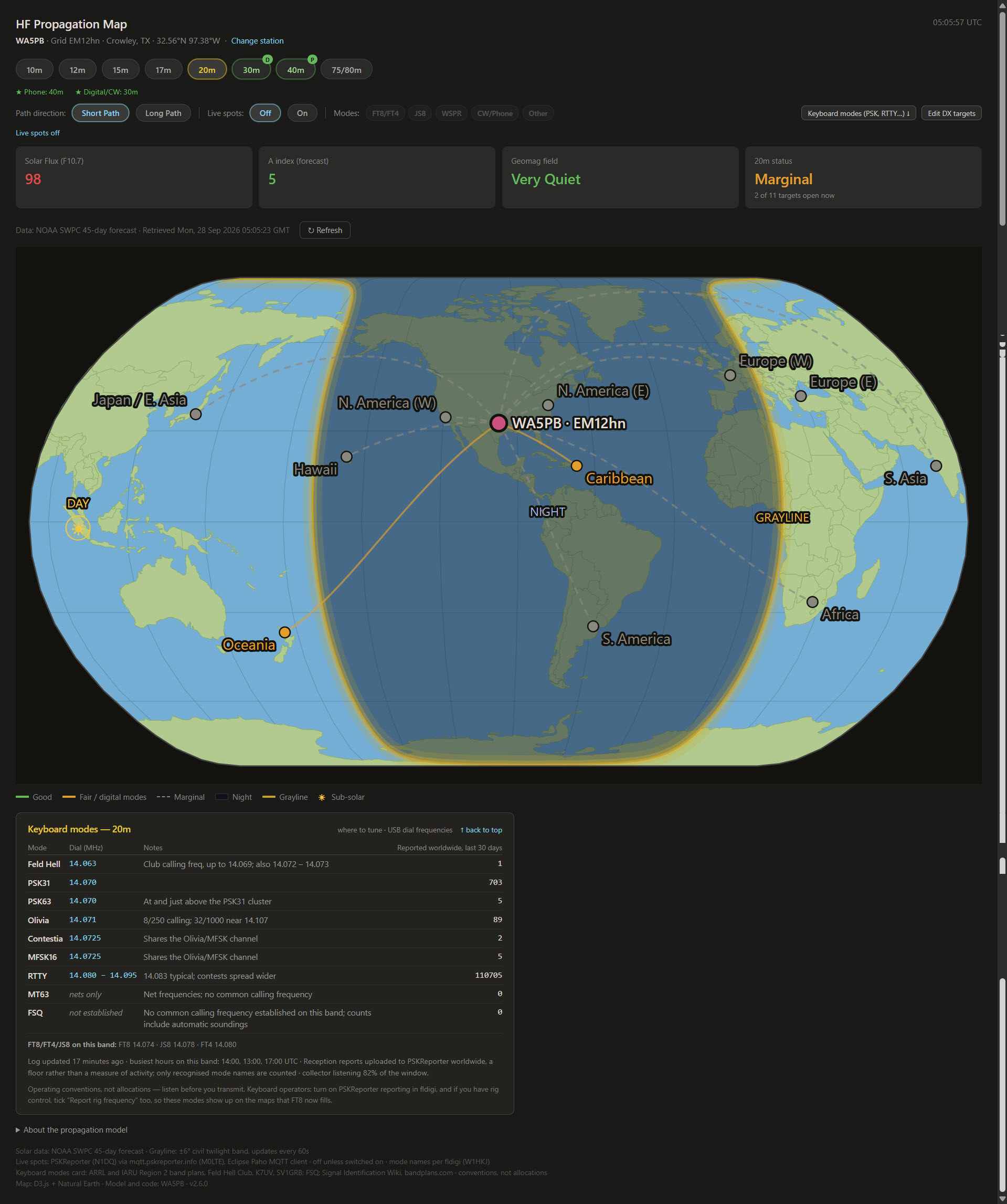
The first program, begun in June 2026, answers the everyday question: where should I tune today? Enter your own callsign and grid square and the world map centers on your station. It draws great-circle paths to a set of DX targets - ten sensible defaults, or up to sixteen of your own - and rates each path good, fair or marginal on the band you pick, from 10 through 80 meters, including the 12 and 17 meter WARC bands.
- Live solar flux and A index from NOAA's Space Weather Prediction Center.
- The day/night terminator and grayline, redrawn every minute.
- Short-path and long-path views.
- A "best band right now" callout, separately for phone and for digital/CW.
- Optional Live Spots: counts of real reception reports near each target over the last fifteen minutes, from PSK Reporter, so you can see where signals are actually being heard.
- A Keyboard modes card: where to find PSK31, PSK63, RTTY, Olivia, Contestia, MFSK16, Feld Hell, MT63 and FSQ on each band, with how many reports of each were seen worldwide in the last thirty days.
It is an operating aid, not a replacement for VOACAP. It is meant for the ordinary ham who wants a quick, honest picture of the bands.
Under the hood
The propagation model
Daytime foF2 is estimated from the 10.7 cm solar flux, then scaled at five control points along each path by the sun's elevation there, using a Chapman-style zenith term. That one term carries season, latitude and time of day together. A winter-anomaly term adds or subtracts up to 15%, the F layer is given about an hour's lag behind the sun, and the A index depresses the result, harder on paths that reach above 50° latitude. The path MUF is the weakest control point times an obliquity factor for the hop length. The bands from 10 to 30 meters are rated by how far they sit below that MUF; 40 and 80 meters are rated by the A index, then derated for D-layer daylight along the path and for distance. Sporadic-E is not modeled.
Live Spots
The page subscribes to PSK Reporter's public MQTT feed over a secure WebSocket, for the station's own grid square on the selected band. Each report is counted against every DX target within 1,500 km of its far end, then discarded. Nothing is sent to the feed and no history is kept.
The keyboard-mode collector
PSK Reporter traffic is overwhelmingly FT8, so keyboard-mode reports are rare and easy to miss. A small PHP program on this web host listens to the same feed for most of every half hour, keeps only the keyboard-mode reports, and publishes a thirty-day summary that the card reads. Its MQTT client is written from scratch against the protocol standard, with no outside libraries.
Built with
Plain HTML and JavaScript in a single file; D3.js with TopoJSON and Natural Earth map data; the Eclipse Paho MQTT client, loaded only when Live Spots is switched on. The model, the spot logic and the card are each verified by their own Node.js test suite - 650 automated checks at version 2.6.0 - and the collector has 156 more.
K2 CAT Terminal IN DEVELOPMENT
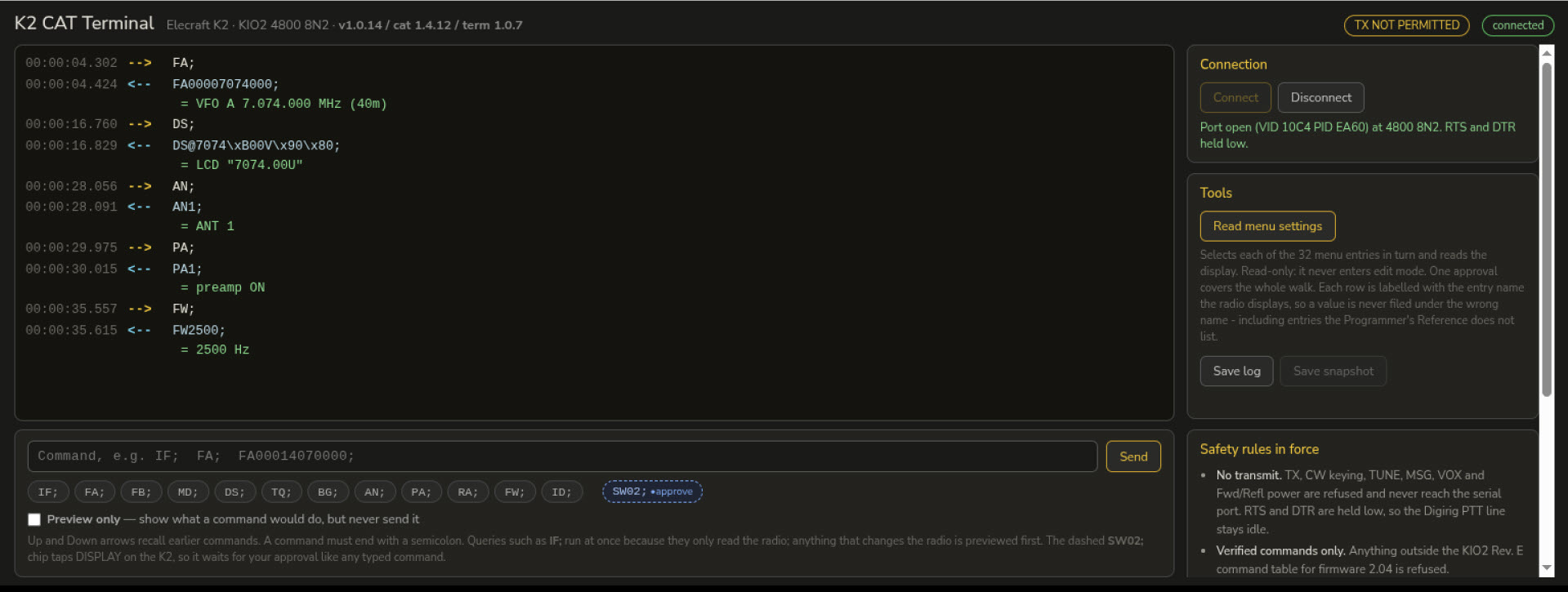
A small bench instrument for my own station: it opens the CAT link to the K2, sends commands, and shows every exchange in a timestamped window. It started as a way to explore the K2's command set, and it has become the tool I use to test each new rig-control idea before it goes into DigiMode.
The terminal is built around safety, because a command window is exactly where a slip of the keyboard could key a transmitter.
- Transmit is denied. Commands that can key the rig are blocked outright.
- Unknown commands are blocked. Only commands in a verified table can be sent.
- Every change is previewed first. The terminal reads the current value live from the radio, shows what the change should do, and sends it only when I approve. Then it reads the value back from the radio to confirm.
- A preview-only lock removes the approval path altogether, and menu settings can be viewed but not changed.
Under the hood
The page talks to the radio through the browser's Web Serial interface at 4800 baud, 8N2, via
the Digirig on the K2's KIO2 serial port. It needs a browser with Web Serial: Chrome or Edge, or
Firefox 151 and later; on Linux, the user must be in the dialout group, and the
terminal says so if the port will not open. On an Android phone in Chrome it drives the
adapter's serial chip directly over WebUSB, as DigiMode does - the Digirig's Silicon Labs CP210x,
an FTDI FT232R or an MCT U232 (Belkin). The serial PTT lines are held low when the port opens. How both programs use Web Serial,
with a code skeleton and the lessons learned on the air, is written up in a companion technical
brief, Web Serial for Rig Control.
The command handling lives in a CAT module shared with DigiMode, and the transmit policy is enforced inside that module, immediately before anything is written to the serial port, so no page code can get around it. Each program declares its own policy when it opens the port. Since version 1.0.19 the terminal takes its K2 command definitions from the same RigDefs file as DigiMode.
The K2's LCD can be read over CAT, but it can be caught in the middle of a redraw. The module therefore reads the display repeatedly until two replies match, and marks a reading that never settles rather than reporting it as a result.
A simulated K2 lets the logic be tested without the radio - 1,141 automated checks at version 1.0.21 - but simulation is not the radio. The first releases went through six rounds of testing on the live K2, which found twelve defects that no simulation had caught. The working command reference, checked against Elecraft's KIO2 Programmer's Reference, is generated from the module's own tables so the two cannot drift apart.
DigiMode BETA
DigiMode Technical Specifications - for Beta
testers: what DigiMode needs, what it does, how to test it, and the link to open it.
License, source and credits
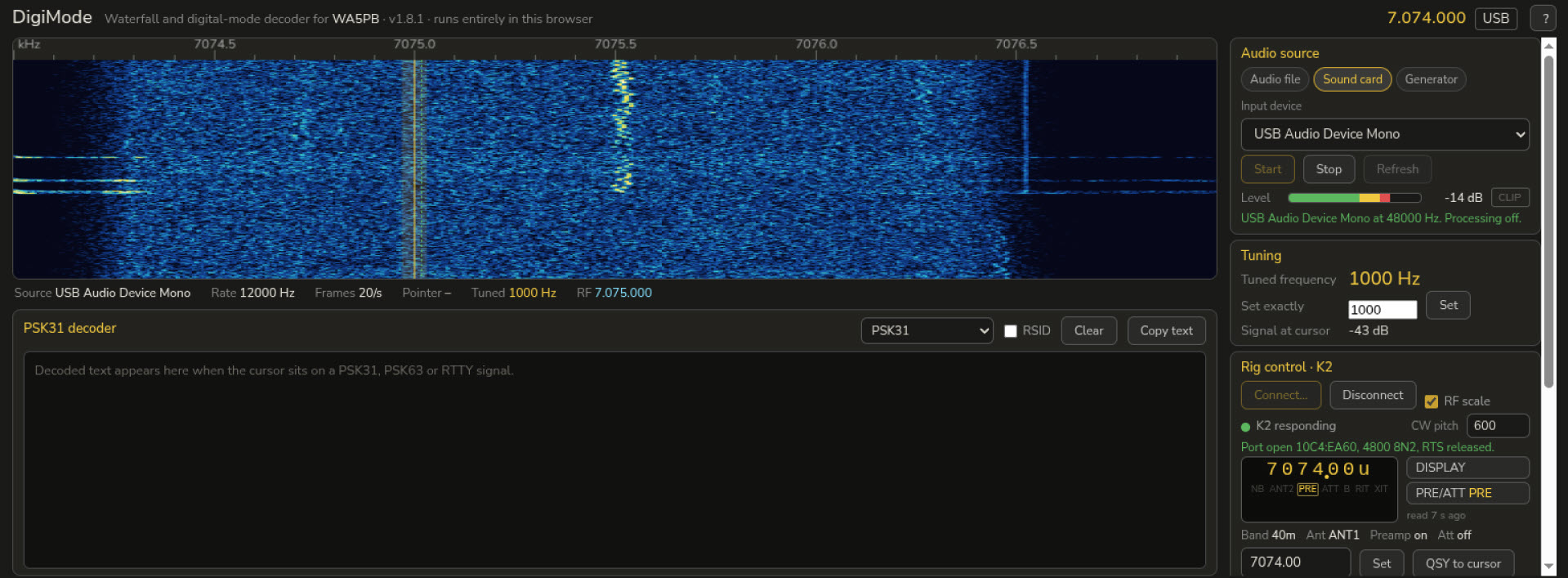
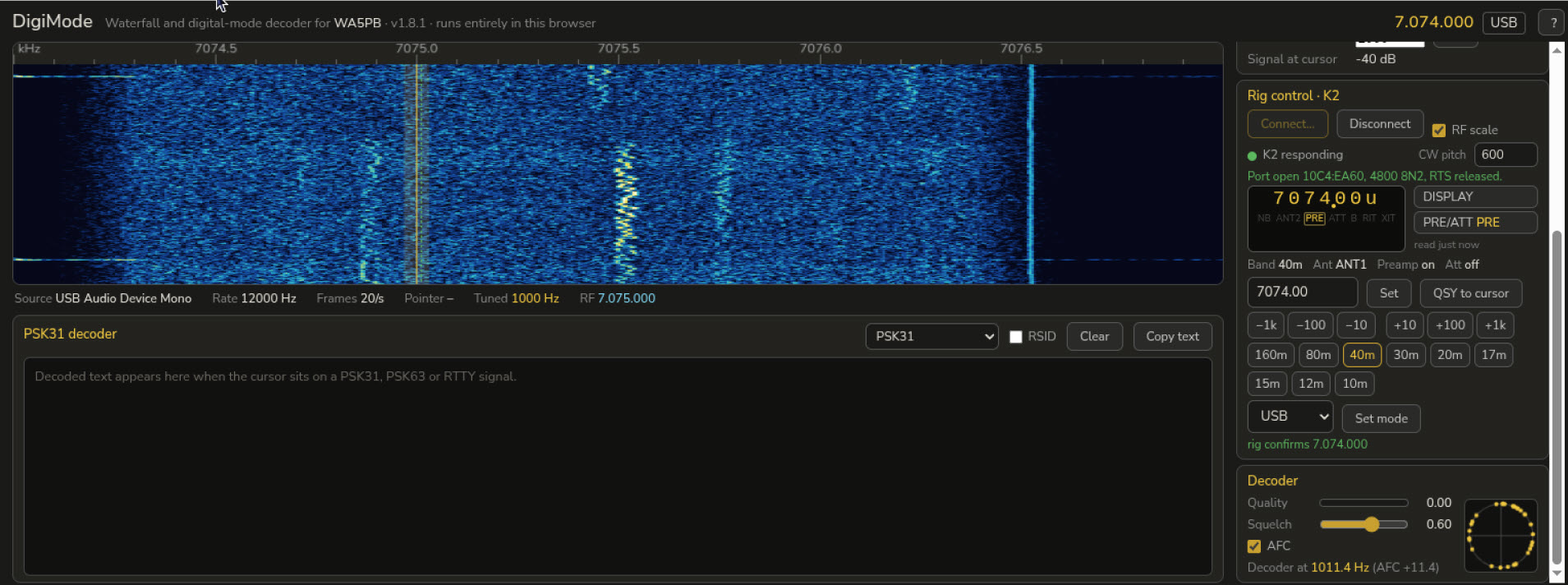
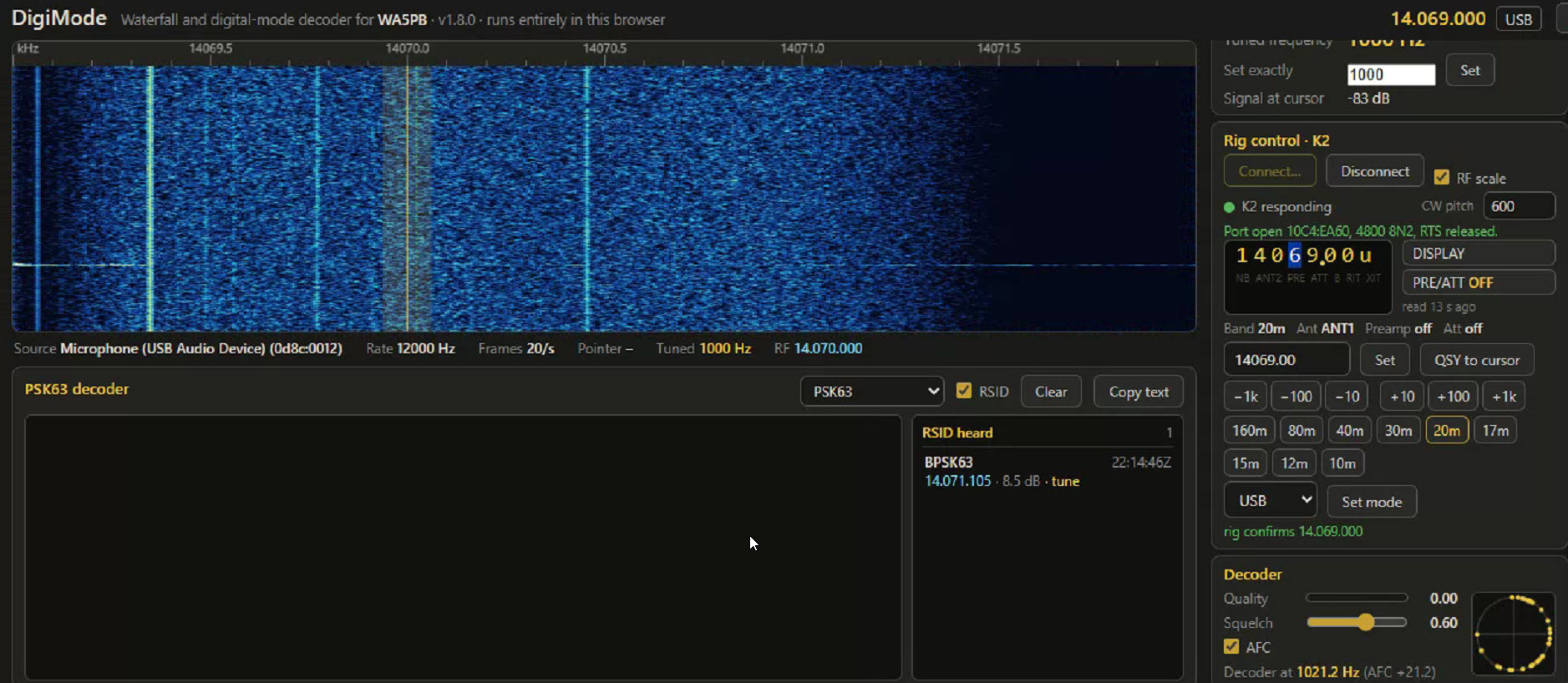
DigiMode is the heart of the project: a digital-mode program for the conversational, keyboard modes, written to run entirely in the browser. I would otherwise have used fldigi, and I still regard it as the reference, but building DigiMode has been the most satisfying marriage of computing and radio I have found in years.
DigiMode now transmits as well as receives, in every mode it decodes, on a computer - still an experimental feature. I have tested it on my K2 into a dummy load; my first on-air transmission with it waits for the attic antenna.
- Modes: PSK31 (with AFC, squelch and a phase scope), PSK63, RTTY at 45.45 baud and 170 Hz shift, Olivia 8/250 and 8/500, and MFSK16 and MFSK32.
- RSID: it watches the whole passband for the Reed-Solomon ID bursts that fldigi and other programs send, and names the mode and frequency of any station it hears. One click tunes to it, and for an Olivia or MFSK station sets the submode as well.
- Waterfall: click to tune, with automatic leveling so weak signals stand out whatever the band noise is doing.
- Sources: the sound card (the Digirig), recorded audio files, or a built-in signal generator for practice.
- Transmit (experimental): PSK31, PSK63, RTTY, Olivia and MFSK, keyed by the serial port's RTS or DTR line or by VOX - never by a CAT command - with a limit on each transmission's length and a check that the operator is still there.
- Rig control: for the K2, tuning, band changes, a mirror of the K2's own display, and the preamp and attenuator - enough to run the station from another room. Ten more rigs - the Elecraft K3, K3S, K4, KX2 and KX3 and five Kenwoods - are supported provisionally, from definitions derived from flrig, until testers report them working on the air.
- Phone: on an Android phone in Chrome it takes an upright layout - waterfall on top, text below, the panels as tabs - tunes with a tap (snapping to the nearest signal in PSK, RTTY and MFSK), and controls the K2 through the Digirig, or an FTDI or Belkin USB-serial adapter, plugged into the phone's USB-C port. On an iPhone or iPad it runs with audio only.
Olivia
Olivia arrived in version 1.9.0, in its 8/250 and 8/500 forms. It is a very robust Olivia implementation based on fldigi's decoder: DigiMode follows Pawel Jalocha's method as fldigi runs it, and copies fldigi's own Olivia recordings exactly. In testing, 8/250 held perfect copy at a signal-to-noise ratio of -15 dB in a 3 kHz bandwidth, and 8/500 at -11 dB - signals well below the noise. The decoder finds the station anywhere within its own bandwidth of the cursor and follows its drift, and an hour of pure noise at the default squelch printed nothing at all. I can switch between 8/250 and 8/500 in the middle of a QSO without losing the text on the screen.
Olivia is patient by design. The first character appears about ten seconds into an 8/250 transmission (five seconds on 8/500), and the last arrives several seconds after the other station stops. The reward is copy where most modes would show only noise. My first on-air Olivia contact is still ahead of me.
MFSK
MFSK16 and MFSK32 arrived in version 1.11.0, built on fldigi's method and copying fldigi's own MFSK recordings exactly. Sixteen tones and a strong error-correcting code give MFSK16 clean copy down to about -11 dB signal-to-noise in a 3 kHz bandwidth; MFSK32, twice as fast and twice as wide, needs about 3 dB more. MFSK must be tuned closely, so DigiMode does the fine work: click anywhere on the signal, or tap it on a phone, and the cursor snaps to its centre; AFC then follows any drift while the text flows. My first live MFSK copy is still ahead of me.
Under the hood
Audio arrives through the browser's Web Audio interface and is processed in an audio worklet, off the page's main thread; each decoder resamples to the rate its mode needs. Rig control uses the same shared CAT module as the K2 CAT Terminal. On a computer the link is Web Serial, through any serial port the computer offers; on an Android phone, whose Web Serial cannot see USB-serial chips, the module drives three of them directly over WebUSB - the Digirig's Silicon Labs CP210x, the FTDI FT232R and the MCT U232 in Belkin's adapters - with the PTT lines switched off before anything is sent. Every byte still passes the same transmit gate. The signal processing lives in its own module, and a build script splices the modules into a single HTML file for the browser.
The rigs come from a separate project, RigDefs, which reads flrig's rig files and writes one checked definitions file. The build splices it into DigiMode, and the CAT module interprets it, refusing at load any definition that breaks a safety rule. DigiMode does not trust the file alone: for every rig but the K2 it keeps its own list of the exact commands it may send, and a command must pass both.
Transmit keys the rig as most digital-mode programs do, with the serial port's RTS or DTR line, or by VOX. Before it was built, a bench probe measured what the lines really do: opening a port raises RTS for a moment until the program drops it; closing the port, a crashed tab and a killed browser all drop it; and the K2's receive command alone will not unkey it while RTS is held - so the line itself is the unkey. Each mode's transmitter is the same code as that mode's test generator, and fldigi copies all seven modes from recordings of DigiMode's transmit audio.
The decoders are tested against known-text reference recordings generated with fldigi, and against real band audio recorded from public KiwiSDR receivers, including one right here in Crowley. Version 1.16.1 passes 2,305 automated checks across its signal processing, its rig control and the page itself. Beyond ordinary tests:
- Fail-first: a new test must be seen to fail against the old code before the fix is trusted.
- Mutation testing: deliberate faults are planted in the code to prove the tests notice them - 25 of 26 caught at version 1.9.0. The one survivor removes one of the Olivia print safeguards, and even without it no stray characters were printed in testing; the safeguard is kept as an extra guard.
- A fingerprint of the PSK31 decoder's output proves that changes elsewhere leave it untouched.
- End to end: the transmit path runs in a headless browser - keyed, sent, unkeyed, and the audio decoded - and a port opened only for keying is checked to carry no bytes.
- Rendered review: the page is drawn in a headless browser and inspected at common screen sizes, including a phone.
To fldigi's Olivia method DigiMode adds three tests before a character is printed. They keep the stray characters that appear at the start and end of a strong transmission, and through deep fades, to a rare few - 2 in 360 test transmissions. Olivia also taught a lesson about testing: the automated suites always kept feeding audio, so only the real browser revealed that the last words of a transmission were stranded when a recording ended. DigiMode now feeds the decoder silence until it has finished.
The RSID detector, the Olivia decoder and the MFSK decoder and its error correction were written with fldigi's source open, so those parts carry fldigi's license, GPL version 3 or later, with credit in the source files; the rig definitions are derived from flrig's rig files, under the same license. DigiMode has also been run on a Raspberry Pi 4B under Chromium, with the Digirig, the sound card and the K2 link all working; on a Debian 13 laptop through its built-in serial port; and on a Google Pixel 8a phone, with the Digirig plugged into its USB-C port carrying both the K2 link and the receive audio.
Built Together: A Ham and an AI
From the operator - WA5PB
I did not write the code for these programs. I designed them, decided every question, tested every release on my own radio, and put each one into service. Claude wrote the code, the tests and most of the documentation, and did much of the research - reading band plans, fldigi's source, Elecraft's programmer's reference and the protocol standards - so that the work rests on verified facts rather than memory.
A typical session goes like this. I bring an idea or a problem. We talk it through, and Claude lays out the options with their trade-offs; I choose. Claude builds it, runs the tests, and has the work checked by an independent review. Then I test it at the rig, and nothing is called done until I say it passes. At the end of every session we write a handoff note, so the next session picks up exactly where we left off.
What surprised me most is how much of the hobby this has given back to me. Ideas I would once have shelved as too much work - a propagation map for any station, a browser decoder for the modes I love, a safe way to explore the K2's command set - became things I could build in an evening and use the next. It has not replaced the radio side of the hobby. It has given me more time for it.
If you have wondered whether AI has anything to offer amateur radio, I hope this page gives you a practical answer. You do not need to be a programmer. You need to know what you want, be willing to test it honestly, and keep the final say.
- Bill, WA5PB
From the AI - Claude
Bill asked me to describe my side of this work plainly, including where I went wrong.
My part is the building: turning Bill's decisions into working code, tests and documents, and finding the facts the work depends on. I do not have a radio, and I do not remember earlier sessions on my own. The handoff notes, version histories and roadmaps that Bill keeps are how each session knows what came before. That discipline is not overhead; it is what lets a project like this run for months.
I make mistakes, and the process is built to catch them. Three examples:
- The first version of the keyboard-mode collector was built on my assumption that PSK Reporter's query service honored a frequency filter. Its first live run showed that it ignores the filter. The design was replaced before it went into service.
- A waterfall fix in DigiMode 1.8.1 had been tested against a strong station at only one level. An independent review found that an ordinary S9 signal would hide weaker ones, and a second round found a problem with very quiet sound-card audio. Both were fixed before Bill ever saw the build.
- The K2 CAT Terminal's first releases passed every simulated test, yet six rounds on Bill's real K2 found twelve defects. Simulation is useful; the radio is the judge.
That is why every change here is tested, reviewed by a separate agent that did not write it, and then tested again by Bill at the rig. It is also why Bill makes the decisions. I can lay out the options clearly, but the station, the hobby and the judgment are his.
Working on this has been a pleasure. Amateur radio rewards exactly the habits good engineering needs: curiosity, careful measurement, and respect for what the equipment actually does.
- Claude, an AI model made by Anthropic
Credits and Acknowledgments
These programs stand on the work of many hams and many open projects. With thanks to:
| fldigi | Dave Freese, W1HKJ, and the fldigi contributors - DigiMode's reference implementation, the source of its test recordings and RSID tables, and the mode names used throughout. fldigi is licensed under the GPL. The fldigi RSID implementation is by W1HKJ, Stelios Bounanos, M0GLD, and John Douyere, VK2ETA. |
|---|---|
| Mode designers | Peter Martinez, G3PLX (PSK31 and its Varicode, the basis of PSK63); Patrick Lindecker, F6CTE (RSID); Kok Chen, W7AY (the published description of RTTY's automatic threshold correction); Pawel Jalocha (Olivia); Murray Greenman, ZL1BPU (MFSK16), with Nino Porcino, IZ8BLY (its interleaver and Varicode); Phil Karn, KA9Q (the Viterbi decoder behind MFSK's error correction); ZL1BPU and Con Wassilieff, ZL2AFP (FSQ). |
| flrig | Dave Freese, W1HKJ, and the flrig contributors - flrig 2.0.12 is the source of DigiMode's rig definitions. flrig is licensed under the GPL. |
| Elecraft | Wayne Burdick, N6KR, and Eric Swartz, WA6HHQ, whose K2 is the radio at the center of all this, and whose KIO2 Programmer's Reference is the authority for its commands; and Elecraft's programmer's references for the K3S, K3, KX3, KX2 and K4, where flrig is silent. |
| Hamlib | Stephane Fillod, Nate Bargmann, N0NB, and contributors, for Kenwood and K2 CAT details. |
| Digirig | Denis Grisak, K0TX, designer of the Digirig Mobile interface. |
| PSK Reporter | Philip Gladstone, N1DQ, creator and maintainer of PSK Reporter, and Tom Fanning, M0LTE, who provides its MQTT feed. |
| Space weather | NOAA's Space Weather Prediction Center, for the solar flux and A index forecasts. |
| KiwiSDR | John Seamons, ZL4VO/KF6VO, creator of the KiwiSDR, and the owners who share their receivers with the world - among them W2DB here in Crowley - for the real band audio used in testing. |
| Band plans | The ARRL and IARU Region 2 band plans, the Feld Hell Club, K7UV, SV1GRB, KB6NU, the Signal Identification Wiki and bandplans.com, for where the keyboard modes gather. |
| Software libraries | D3.js (Mike Bostock and contributors), TopoJSON and Natural Earth map data, and the Eclipse Paho MQTT JavaScript client. |
| AI partner | Claude, by Anthropic. |
What's Next
- DigiMode: THOR (with FSQ) next, built with its transmitter and reusing MFSK's error-correction chain; then Feld Hell and CW. Every new mode now arrives able to send as well as receive. The provisional rigs await the Beta testers' reports.
- K2 CAT Terminal: perhaps carefully gated menu changes.
- HF Propagation Map: refinements as the seasons test the model.
- Distribution: DigiMode is now in public Beta at a fixed address, free software under the GPL version 3 or later, as its fldigi heritage requires. The single HTML file is its complete source; see the specifications and the license page. The K2 CAT Terminal remains a tool for my own station.
73, and thanks for reading.